

How Quickly Can Website Accessibility Barriers Come Down?
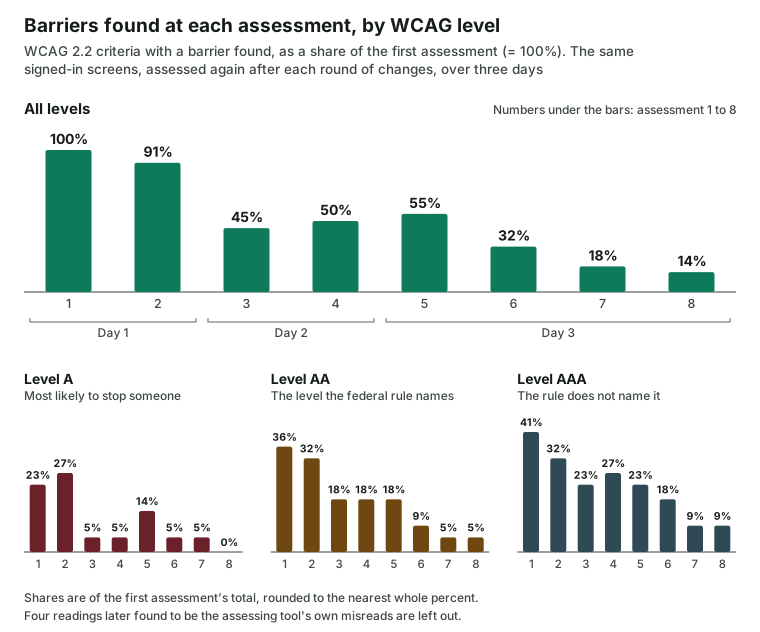
One web service's signed-in screens, assessed after every round of changes. In three days the list Esther found fell to about a seventh of where it started, with none at Level A.
Rick Hensbergen4 minute read
One service, assessed after every change
A first accessibility assessment usually produces a list that looks too long to finish. The example here shows how quickly that list can come down when the barriers are taken in order. Over three days (October 14 to October 16, 2026), the screens of one web service that people use after they sign in were assessed by Esther, changed, and assessed again, eight times in all. Each new list showed what the last round of changes had cleared.
The first list looked long
On the first assessment, Esther found barriers at all three levels of WCAG 2.2, the Web Content Accessibility Guidelines. Of the criteria with a barrier, about a quarter (23%) were at Level A, the level that holds the barriers most likely to stop someone from using a page at all. Just over a third (36%) were at Level AA, and the rest (41%) at Level AAA. (The federal rule for state and local government websites names WCAG 2.1 Level AA. WCAG 2.2 adds a few criteria, and two of them appear below.)
A list like that reads as a project with no end. Three days later, it read differently.
Three days later, the list was short
By the last assessment, the list had fallen to about a seventh of where it started, and no barrier was left at Level A. What remained at Level AA was text that clipped when a reader widened the spacing between lines and letters, which many people with dyslexia or low vision do to read more easily. The rest sat at Level AAA, which the federal rule does not name.
Here are the barriers that took the longest to clear, in the order they were cleared:
- A keyboard focus hidden behind a loading message (WCAG 2.4.11, Level AA, a WCAG 2.2 criterion the federal rule does not name), and controls too small to tap with confidence (WCAG 2.5.5, Level AAA), cleared in the same round.
- A button whose spoken name did not match the label on the screen (WCAG 2.5.3, Level A), cleared one round later, the last Level A barrier to clear.
One was still open on the last assessment: the text that clipped under wider spacing (WCAG 1.4.12, Level AA).
Most barriers came from a few shared parts
The list fell in steps, though not at every one. Level A went up twice before it came down for good. The second assessment covered two more screens than the first, and it found one new barrier: a person having to enter the same information twice in the same process (WCAG 3.3.7, Redundant Entry, Level A, a WCAG 2.2 criterion the federal rule does not name). At the fifth, two barriers that had been cleared came back: chat messages marked up as a list, and a notification row with its Dismiss button nested inside it. Both were cleared again in the next round.
The reason the list fell is the same one Esther found when it measured how much work a typical website needs. A barrier built into a shared part of a site appears on every screen that uses that part. The notifications button in this service's page header, for instance, carried a spoken name that did not match what the screen showed. Esther found that barrier on every screen that carries the header. One change to the header cleared it from all of them.
The same pattern held for a loading message that briefly covered the keyboard focus on two summary screens, and for a label style used across several forms. Each was one decision, made once, in one place.
What the order taught
Three choices shaped how fast the list came down, and each one applies to any organization's site.
The first was to start with what stops someone from using a screen at all. Level A barriers went first, because a person who cannot operate a button cannot get past it, whatever else on the page is right.
The second was to look for the shared part behind each barrier before touching any single screen. A barrier that appears on many screens is usually one barrier, counted many times.
The third was to assess again after every change, rather than at the end. Each new assessment showed what had cleared, what had not, and what had come back. Without a fresh, dated assessment, a barrier that returned would have stayed on the screen unnoticed.
The rule, and the size of the work
For state and local governments, the federal rule names WCAG 2.1 Level AA, with deadlines of April 26, 2027, for governments serving 50,000 people or more, and April 26, 2028, for the rest. The deadline is real. The panic is not. Barriers like the ones above usually trace back to a handful of shared parts, and one change to a shared part clears every screen built from it.
Where your own site stands
Three questions show whether your list is closer to finished than it looks:
- Do you know which barriers on your site stop someone from using a page at all? Those are the Level A barriers, and they are the place to begin.
- Does each barrier trace back to a shared part, or to a single page? A barrier found on many pages is usually one change, made once.
- Is there a dated record of what was found, and of what has been resolved since? Without one, the list getting shorter is something nobody can show.
Most of a long list sits in a few shared parts, and the work becomes countable once those parts are found. What this looks like for state and local government is at For government, and for private organizations at For business. How much work a typical website needs is in How much work is it to fix website accessibility?
Eight assessments by Esther of the signed-in screens of one web service, between October 14 and October 16, 2026, against WCAG 2.2 at Levels A, AA, and AAA, each after a round of changes. Shares are of the WCAG 2.2 success criteria with at least one barrier found at the first assessment, rounded to the nearest whole percent. Four readings later found to be the assessing tool's own misreads are left out.
About the author

Rick Hensbergen is the founder and CEO of Esther. He spent twenty years leading software testing and quality teams for major banks in the United States and the United Kingdom.