

What Do Website Accessibility Lawsuits Name, and What Do They Leave Out?
We read recent website accessibility complaints from three plaintiffs who each filed several. Most name pictures and buttons a screen reader can't describe. None names faint text.
Rick Hensbergen4 minute read
What we read
From September 2 to October 8, 2026, three people who are legally blind filed website accessibility suits against online stores and restaurants in federal courts in New York, Florida, and Pennsylvania. Each of the three filed several in those five weeks. We read every one of their complaints from that window, each from the court's own filing, and listed every barrier it says the plaintiff ran into on the website.
Every complaint is about a website, and each is an allegation that no court has tested. The shares below are shares of these complaints, and one complaint can name several barriers.
What the complaints name most
Two barriers came up far more often than any other.
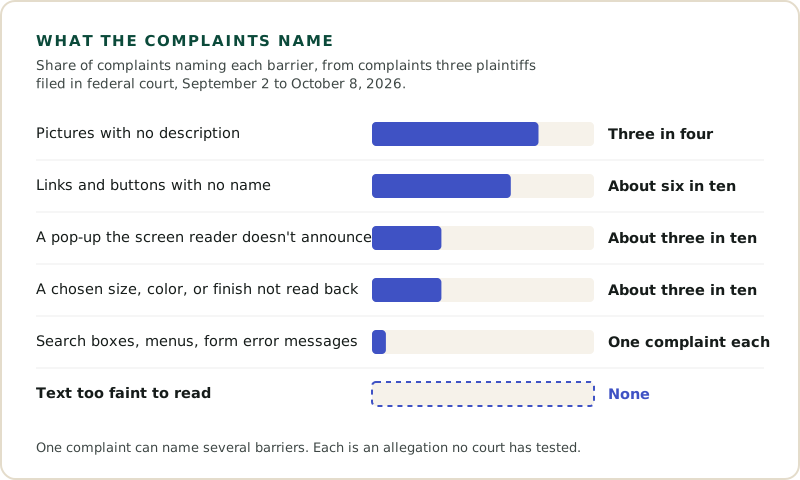
- Pictures with no description. Three in four complaints said images on the site had no text description, so a person listening to the page hears nothing about what a picture shows. One set of complaints puts it this way: "The lack of alt-text on these graphics prevents screen readers from accurately vocalizing a description of the graphics."
- Links and buttons with no name. About six in ten said a link or button, read aloud, gave no clue to what it does. One set lists it as "Empty Links That Contain No Text".
Moments in a purchase came next. About three in ten complaints said a pop-up opened without the screen reader saying so, in one case "Change Country Dialog State Not Announced to Screen Reader". About three in ten said the size, color, or finish a shopper picked was never read back before checkout. Search boxes, menus, and form error messages each came up in only one complaint.
Faint text is the barrier none of them names
None of these complaints names text that is too faint to read. The word contrast appears in none of them.
All three plaintiffs describe themselves as legally blind and as using a screen reader, software that reads a web page aloud. A screen reader reads pale gray text exactly as it reads black text, which may be why no complaint here mentions it. That last point is general knowledge about screen readers, not something the filings say.
Faint text still tops Esther's published findings on government websites (What are the most common accessibility problems on government websites?). City and county sites are a different kind of site from the stores and restaurants sued here, and neither figure is a rate for the other. What the comparison shows is a gap. A site fixed only for what complaints name can keep the barrier that reaches people with low vision, and anyone reading a phone outdoors.
Letters first, and one template
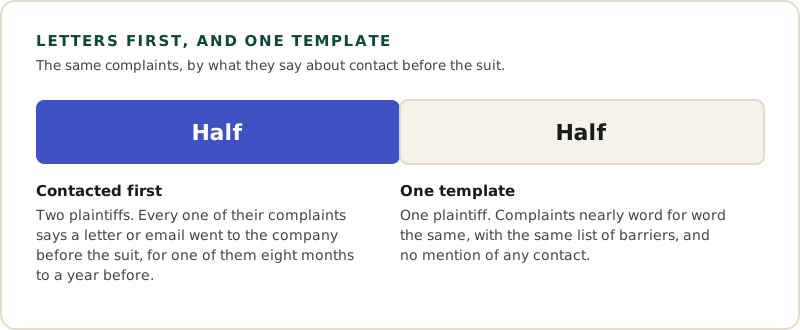
Half of the complaints said the company had been contacted before the suit. For two of the plaintiffs, every complaint said a letter or email went first, for one of them eight months to a year before filing.
The third plaintiff's complaints said nothing about any contact, and they were nearly word for word the same, with an identical list of barriers in each. Only the company, the website, the product, and the visit date changed. Those complaints are half of the ones read, and every one of them names missing image descriptions and unnamed links, which is a large part of why those two barriers lead. The other two plaintiffs reused their legal text but described each site's own barriers, and one gave the accessibility guideline behind every barrier.
What this means for your own site
Unnamed buttons and pop-ups that go unannounced often sit in parts of a site built once and reused on every page. One change at the source clears every page built from it, which is why the work behind a long list of barriers is smaller than the list (How much work is it to fix website accessibility?).
- When a person using a screen reader reaches the pictures, links, and buttons on your busiest pages, do they hear what each one shows or does?
- When a pop-up opens, or a shopper picks a size or a color, does the screen reader say so?
- And beyond anything a complaint names, is the text on your site dark enough to read?
A complaint or a demand letter asks what an organization knew about its website, and when. An automated report covers the checks it ran. An independent, dated record covers what a person actually runs into. Esther assesses a site and dates every finding, including the barriers complaints tend to leave out, so whoever answers for the site can show what was found, when, and what has been resolved since. Public bodies can see what that means for them at For government, and stores, restaurants, and other private organizations at For business.
Figures describe the website accessibility complaints three plaintiffs filed in federal court from September 2 to October 8, 2026, each read from the court's own filing.
About the author

Rick Hensbergen is the founder and CEO of Esther. He has spent his career in governance and risk, twenty years of it at major banks in the United States and the United Kingdom, including as a Senior Manager approved by the UK's Financial Conduct Authority.